Git
Recover lost file
What happened to me: I renamed a file from readme.md to README.md and edited it, then I ran git rm readme.md and the file README.md was gone for good. I made many changes and I screamed!! But his SO question saved me:
This is the magic command:
git fsck --lost-foundThereafter take a sha value of a dangling blob entry and run git show to observe and save it, e.g.
git show 8f72c7d79f964b8279da93ca8c05bd685e892756 > restored_file.jsRecover popped stash
With git stash pop the stash is gone. With git stash apply it remains on the stash stack.
-
Run
Be sure
gitkis installed. On OSX you can install it withbrew install git-gui(notbrew install gitk).gitk --all $( git fsck --no-reflog | awk '/dangling commit/ {print $3}' )- This will open a git gui.
- Copy the hash of the stash.
-
Run
git stash apply $stash_hash
Solution taken from this SO answer.
Random
How to Use Github for Hosting Files
-
Change remote repository of local git project folder
git remote set-url origin https://github.com/USERNAME/OTHERREPOSITORY.git - Visualize
git pull/fetch/push:
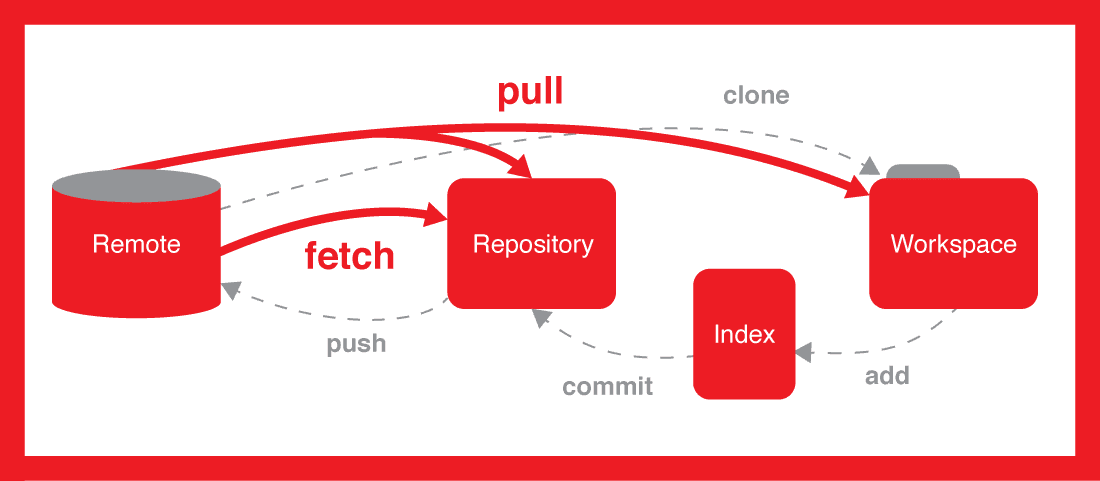
Source: https://stackoverflow.com/questions/1783405/how-do-i-check-out-a-remote-git-branch#answer-46057289
Discuss on Twitter ● Improve this article: Edit on GitHub