React Performance
React profiler
Profiler
Gives you per component
- duration of load
- amount of renders
Performance Improvement Solutions
-
Wrap component in
React.memo- Shallow compare does check for equality. When comparing scalar values (numbers, strings) it compares their values. When comparing objects, it does not compare their attributes - only their references are compared (e.g. “do they point to same object?“)
- Therefore you should not mutate objects but always create new instances to assure a component gets updated! See this section in the React docs
- Use
useMemohook for values which don’t have to be recomputed in every render - Use lazy loading if a lot of things are rendered on a page and not everything is needed at once.
Problem: Rerendering issue
Rerendering issue (i.e. slow performance) of children with lots of data if only a small part of shared state changes.
Background
The infobox list, in its basic form, contains a list of infoboxes to be rendered and a button which opens a pop-up to render the infoxbox. Opening and closing the pop-up however takes longer than expected even after the requested data is fetched. This was observed during the stage of development when the InfoboxListContainer managed the state of both the fetched infobox list as well as the pop-up.
Findings
- Shortening the list decreased the waiting time
=>list dependent. - Profilers and checkpoints showed render methods for the
EntityListcomponent - the most basic component=>list is being rendered when it is not expected to. - Separating the two states by moving the pop-up rendering to a different component made a performance improvement of 25% - though still slow on IE11.
- Using keys from React has no effect since the pop-up and the infobox-list aren’t part of an array.
- The painting for IE11 takes about 1 second. This includes computing the styling. (Independent of JS code)
Explanation
The reason for the unwanted rerenderings of the list (with the pop-up (a.k.a. modal) as parent or in the same file, is that the list and the popup props are in the same state. So if one of them changes, it would rerender itself and the also trigger rerenders in its children (where the list is one of them).
Hence, closing the Popup changes changes popup: true to popup: false (in the state of EditorInfoBoxListContainer which is the parent of InfoboxListContainer). This leads to updating all of its children.
Solution
Applying a shallow comparison of the list in shouldComponentUpdate of the list components (down to the last child, i.e. EntitiesList) stop unnecessary rerenders of the list while interacting with the Popup:
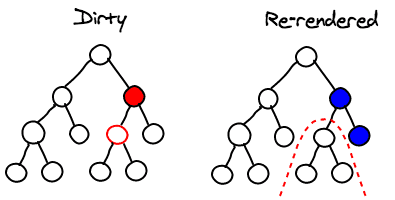
The right hand side tree in the image out of this good article about React performance uses shallow comparison with Pure components, the left hand side tree does not.
Further possible improvements:
- Store list in an immutable data structure to ease shallow comparisons.
-
Redux + selectors
- Really separate containers with selective access to a general state (e.g. a Redux store for that matter) via selectors which use memoization etc (e.g. https://github.com/reduxjs/reselect). Alternatively redux’s
select()could be used. It is compared to and thereselectlibrary in this article. - With a central redux state, The Popup and InfoboxList components would not be in a parent-child relationship and thus changing the popup state would not cause the Infoboxlist to rerender.
- Really separate containers with selective access to a general state (e.g. a Redux store for that matter) via selectors which use memoization etc (e.g. https://github.com/reduxjs/reselect). Alternatively redux’s
Problem: useEffect dependencies change on every render
This code will trigger the following ESLint warning:
The ‘handleResetPassword’ function makes the dependencies of useEffect Hook (at line 80) change on every render. To fix this, wrap the definition of ‘handleResetPassword’ in its own useCallback() Hook.eslint(react-hooks/exhaustive-deps)
const handleResetPassword = () => {
    if (isValidEmail(email)) {
      resetPassword(email);
    } else {
      navigation.navigate(RouteNames.ResetPasswordScreen);
    }
  };

  useEffect(() => {
    // use error here as well...
    handleResetPassword();
}, [error, handleResetPassword]);Solution: Wrapping handleResetPassword in a useCallback hook fixes the warning:
  const handleResetPassword = useCallback(() => {
    () => {
      if (isValidEmail(email)) {
        resetPassword(email);
      } else {
        navigation.navigate(RouteNames.ResetPasswordScreen);
      }
    };
  }, [email, resetPassword, navigation]);
Don’t unnecessarily compute values
Scenario:
- Output of decibel calculation (from audio stream) updates state variable in audio service every 50ms.
- Component wants to display current audio value as animated sound meter, rendering an animation every 100ms
Bad behavior:
- pass
currentDbLevelvariable (which is updated every 50ms) to SoundMeter component directly - values will diverge over time, because component needs value every 100ms but gets it more frequently
- Also animation was a bit laggy.
Solution:
- Pass reference of entire service to component and only read decibel value from there when needed.
Data Type Conversion
The data type conversion is all handled in the branch (already reviewed and merged) where we wrote the implementation of the audio analysis service. Interestingly, we were able to manipulate the data quite effectively using the
bufferclass which supports manipulating byte arrays into a fairly wide variety of different data types, however thisbufferlacked support for 16 bit floats. 16 bit floats appear to be a pretty common format for recording audio data, and not very widely used outside of that.
Not-visble views being updated
- In React Native navigation views are pushed to the Stack but still remain mounted.
- Via Redux they may be updated then.
https://twitter.com/kzzzf/status/1454087372895883266?s=12
- Library react-freeze
Discuss on Twitter ● Improve this article: Edit on GitHub